
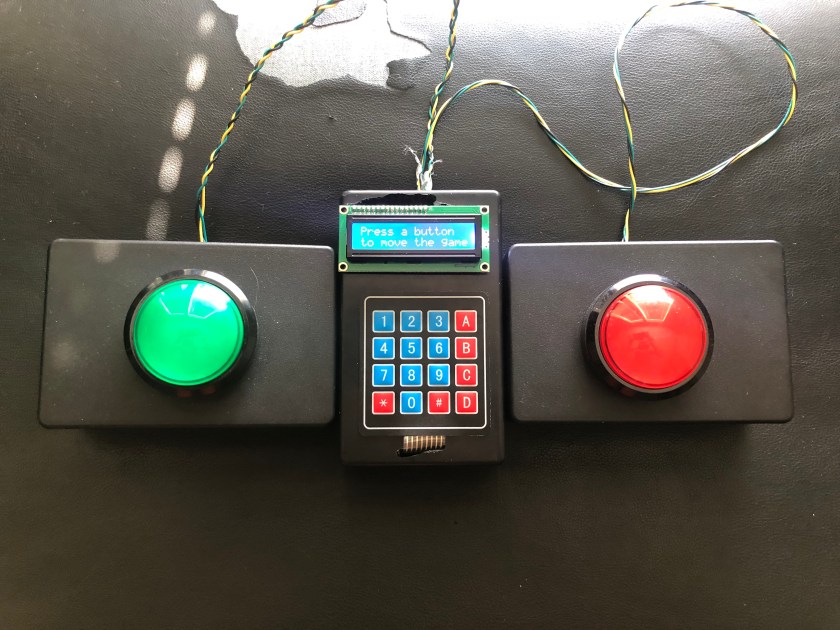
From Richard Dawson to Steve Harvey, Family Feud is a game show that many people enjoy watching. Without a doubt, many families have fantasized about how they would perform if given the chance. Now, thanks to the Internet, you can easily access thousands of questions to test your skills. But, answering the questions is only half the fun of Family Feud. The remaining half comes from the interaction with the game itself. In order to provide a more gratifying and entertaining experience, in this project we will attempt to automate the game of Family Feud so you can get a chance to put your family to the test.
Required Materials:
- A computer (Windows 10 was used in this project)
- 1x ESP32 development board
- 2x Buttons
- 2x LEDs
- 1x 4×4 Keypad
- 1x I2C LCD
- Several feet of wire
Project Overview
In the last article, we made the faceoff buttons and host controller. Now, in this article, we will focus on the software that will allow the host to move the game along.
The software we design must accomplish several tasks. We must read the inputs of the buttons and keypad, output data to the LCD, generate a web server where the data will be displayed, update the web page, and allow users to input new questions and answers. This is no small task, but we will go through each part step-by-step so you can understand every line of code.
Making the Webpage
The focal point of the project is the webpage where the board is displayed. HTML will be the main programming language that is used. Since we want to continuously update the game, we will also be using JavaScript and AJAX in order to update the page without requiring a refresh.
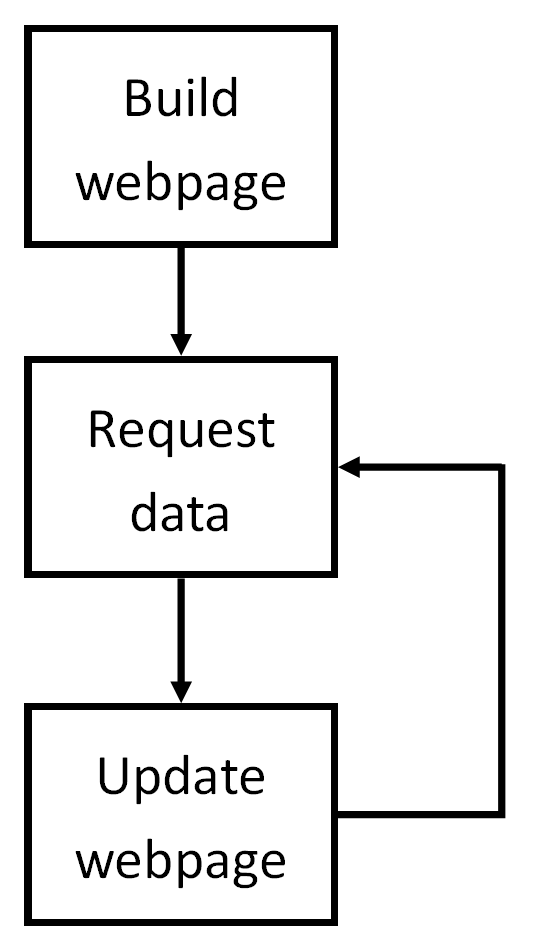
To start, we first create the foundation of the webpage. This code ensures that the webpage fits the window, as well as defines some styles that we will use later on. The unanswered and answered styles will be applied to the answers to quickly change their styling. We will also use the style blank in order to generate a white background to display points, strikes, and other text. The code for this section is shown below.
<!DOCTYPE html>
<html>
<head>
    <meta name="viewport" content="width=device-width, initial-scale=1">
<style>
.unanswered {
  background-color: black;
    color: white;
    padding: 10px;
    font-size: 200%;
    text-align: left
}
.answered {
  background-color: aquamarine;
    color: black;
    padding: 10px;
    font-size: 200%;
    text-align: left
}
.blank {
    background-color: white;
    color: black;
    padding: 10px;
    font-size: 200%;
    text-align: left;
}
</style>
</head>
Now that we have the styles set, we can generate the body of the webpage. First, we set the background color of the page to gold to better resemble the actual game board. Next, we create a header that has the title, game number, and the number of answers on the board. Since the number of answers can change from game to game, we will have to request the number of answers to display. We use <span> to generate a placeholder where we can later add the correct answer. It is important to note the ID that is used, as this is how we will find the information that must be updated.
<body style="background-color:gold">
<h1 style="text-align:center; font-size:200%;">
    Family Feud
</h1>
<h2 style="text-align:center; font-size:100%;">
    Game Number <span id="gameNum"></span>
</h2>
<h3 style="text-align:center; font-size:100%;">
    Top <span id="numAns"></span><span> answers on the board.</span>
</h3>
Next, we will need to create a placeholder for the current available points. We will use a similar method shown above. In addition, we will make a placeholder for the current strikes. Following this, we will create placeholders for each team’s points in order to keep score throughout the game. Each of these placeholders follows the same approach as before, so specific code is not included here. The full and complete code is at the bottom of this article.
Next, we must include some audio files. These files will be played whenever someone presses a faceoff button, gets a strike, gets an answer correct, or when we want the theme to play. Since we will be going back to control these audio files, we must make sure we give them a proper ID. The code for these files is shown below. (Note: the src will be discussed later on.)
<audio id="buzzer" preload="auto">
  <source src="/buzzer" type="audio/wav">
Your browser does not support the audio element.
</audio>
<audio id="ding" preload="auto">
    <source src="/ding" type="audio/mp3">
  Your browser does not support the audio element.
</audio>
<audio id="theme" preload="auto">
    <source src="/theme" type="audio/mp3">
  Your browser does not support the audio element.
</audio>
<audio id="ring" preload="auto">
    <source src="/ring" type="audio/mp3">
  Your browser does not support the audio element.
</audio>
Lastly, we must create blocks for each answer. Since we have a maximum of 8 answers, we must create 8 blocks. Each block will include the answer and its associated points. We will use code later to update these blocks dynamically, but for now, we can simply leave them blank. We also include links to go to the next game, as well as to input new data. We will create each of those webpages soon.
<div id = "block1">
    <p>
        <span id="a1"></span><span style="float:right" id="p1"></span>
    </p>
</div><br>
<div id = "block2">
    <p>
        <span id="a2"></span><span style="float:right" id="p2"></span>
    </p>
</div><br>
<div id = "block3">
    <p>
        <span id="a3"></span><span style="float:right" id="p3"></span>
    </p>
</div><br>
<div id = "block4">
    <p>
        <span id="a4"></span><span style="float:right" id="p4"></span>
    </p>
</div><br>
<div id = "block5">
    <p>
        <span id="a5"></span><span style="float:right" id="p5"></span>
    </p>
</div><br>
<div id = "block6">
    <p>
        <span id="a6"></span><span style="float:right" id="p6"></span>
    </p>
</div><br>
<div id = "block7">
    <p>
        <span id="a7"></span><span style="float:right" id="p7"></span>
    </p>
</div><br>
<div id = "block8">
    <p>
        <span id="a8"></span><span style="float:right" id="p8"></span>
    </p>
</div><br>
<a href="next_game">
    Ready for the next game? Click here!
</a><br><br>
<a href="input_page">
    Need to start a new game? Click here!
</a>
</body>
Now that the HTML is completed for the home page, we need JavaScript to dynamically update the page. We don’t want to have to refresh each time an answer changes, so we will use AJAX. AJAX is a JavaScript method of dynamically updating webpages, and it is perfect for our project.
First, we must create several variables. These variables store information such as the game number, number of answers, number of strikes, and states of each answer. Instead of writing a bunch of lines in a single looping code, we can use functions which will make our job much easier. Each function follows a similar structure, so if you understand one, you understand all of them.
Let’s look at the function updateStrikes(). We begin by creating an xhttp object, and tell it that, when its state changes so that it is ready and we got a 200 status code (which means we found the right page), it will update the block “strikes” with whatever the page returns. We then tell it how we want to get the information (either GET or POST), and then send the request.
This means that, on the server side (which is the ESP32 side), we want to return a certain number of X’s depending on the number of strikes. We will look at this code more later, but for now, we can simply trust that the ESP will return the correct number of X’s.
    function updateStrikes() {
        var xhttpf = new XMLHttpRequest();
        xhttpf.onreadystatechange = function() {
            if(this.readyState == 4 && this.status == 200) {
                document.getElementById("strikes").innerHTML = this.responseText;
            }
        }
        xhttpf.open("GET", "strikes", true);
        xhttpf.send();
    }
Sometimes, however, we need to update audio instead of one of our blocks. To do this, we use more functions. updateBuzzer() sends a similar xhttp request, except this time, calls a function called soundBuzzer() if the server returns true. soundBuzzer() simply plays the audio associated with the ID buzzer. The code for this is shown below.
    function updateBuzzer() {
        var xhttpg = new XMLHttpRequest();
        xhttpg.onreadystatechange = function() {
            if(this.readyState == 4 && this.status == 200) {
                var x = this.responseText;
                if(x=="true"){
                    soundBuzzer();
                }
            }
        }
        xhttpg.open("GET", "buzzState", true);
        xhttpg.send();
    }

    function soundBuzzer() {
        var z = document.getElementById("buzzer");
        z.play();
    }
Some of the code is more complex, and has several nested functions, but the meaning of the code is clear. HTTP requests are sent to the server, and, depending on the response, different blocks of the webpage are updated. The setInterval() function is used to repeat these functions multiple times per second. Functions with more precedence are repeated faster, while the slower functions which are less important are repeated less frequently.
Submitting New Answers
In the case of a hard-reset, new answers must be submit. Earlier, we established a link which would take us to a form where we could submit the new answers. Now, we will focus on making this form.
Making the form is very simple. We use an HTML form, and tell it to submit the results to the page “/form_submit”. Next, we simply create boxes with labels representing each answer, and its associated points. The code for this is shown below.
<!DOCTYPE html>
<html>
<body>
<h1>
    Game Input Screen
</h1>
<h2>
    Game 1
</h2>
<form action="/form_submit">
    <label for="q1">
        Game 1 Question:
    </label><br>
    <input type="text" id="q1" name="q1"><br>
    <label for="numAns1">
        Number of Answers for Game 1:
    </label><br>
    <input type="text" id="numAns1" name="numAns1"><br>
    <label for="q1a1">
        Number 1 Answer:
    </label><br>
    <input type="text" id="q1a1" name="q1a1"><br>
    <label for="q1p1">
        Points:
    </label><br>
    <input type="text" id="q1p1" name="q1p1"><br>
    <label for="q1a2">
        Number 2 Answer:
    </label><br>
    <input type="text" id="q1a2" name="q1a2"><br>
    <label for="q1p1">
        Points:
    </label><br>
    <input type="text" id="q1p2" name="q1p2"><br>
    <label for="q1a3">
        Number 3 Answer:
    </label><br>
    <input type="text" id="q1a3" name="q1a3"><br>
    <label for="q1p1">
        Points:
    </label><br>
    <input type="text" id="q1p3" name="q1p3"><br>
    <label for="q1a4">
        Number 4 Answer:
    </label><br>
    <input type="text" id="q1a4" name="q1a4"><br>
    <label for="q1p1">
        Points:
    </label><br>
    <input type="text" id="q1p4" name="q1p4"><br>
    <label for="q1a5">
        Number 5 Answer:
    </label><br>
    <input type="text" id="q1a5" name="q1a5"><br>
    <label for="q1p1">
        Points:
    </label><br>
    <input type="text" id="q1p5" name="q1p5"><br>
    <label for="q1a6">
        Number 6 Answer:
    </label><br>
    <input type="text" id="q1a6" name="q1a6"><br>
    <label for="q1p1">
        Points:
    </label><br>
    <input type="text" id="q1p6" name="q1p6"><br>
    <label for="q1a7">
        Number 7 Answer:
    </label><br>
    <input type="text" id="q1a7" name="q1a7"><br>
    <label for="q1p1">
        Points:
    </label><br>
    <input type="text" id="q1p7" name="q1p7"><br>
    <label for="q1a8">
        Number 8 Answer:
    </label><br>
    <input type="text" id="q1a8" name="q1a8"><br>
    <label for="q1p1">
        Points:
    </label><br>
    <input type="text" id="q1p8" name="q1p8"><br>
    <br>
    <h2>
        Game 2
    </h2>
    <label for="q2">
        Game 2 Question:
    </label><br>
    <input type="text" id="q2" name="q2"><br>
    <label for="numAns2">
        Number of Answers for Game 2:
    </label><br>
    <input type="text" id="numAns2" name="numAns2"><br>
    <label for="q2a1">
        Number 1 Answer:
    </label><br>
    <input type="text" id="q2a1" name="q2a1"><br>
    <label for="q2p1">
        Points:
    </label><br>
    <input type="text" id="q2p1" name="q2p1"><br>
    <label for="q2a2">
        Number 2 Answer:
    </label><br>
    <input type="text" id="q2a2" name="q2a2"><br>
    <label for="q2p1">
        Points:
    </label><br>
    <input type="text" id="q2p2" name="q2p2"><br>
    <label for="q2a3">
        Number 3 Answer:
    </label><br>
    <input type="text" id="q2a3" name="q2a3"><br>
    <label for="q2p1">
        Points:
    </label><br>
    <input type="text" id="q2p3" name="q2p3"><br>
    <label for="q2a4">
        Number 4 Answer:
    </label><br>
    <input type="text" id="q2a4" name="q2a4"><br>
    <label for="q2p1">
        Points:
    </label><br>
    <input type="text" id="q2p4" name="q2p4"><br>
    <label for="q2a5">
        Number 5 Answer:
    </label><br>
    <input type="text" id="q2a5" name="q2a5"><br>
    <label for="q2p1">
        Points:
    </label><br>
    <input type="text" id="q2p5" name="q2p5"><br>
    <label for="q2a6">
        Number 6 Answer:
    </label><br>
    <input type="text" id="q2a6" name="q2a6"><br>
    <label for="q2p1">
        Points:
    </label><br>
    <input type="text" id="q2p6" name="q2p6"><br>
    <label for="q2a7">
        Number 7 Answer:
    </label><br>
    <input type="text" id="q2a7" name="q2a7"><br>
    <label for="q2p1">
        Points:
    </label><br>
    <input type="text" id="q2p7" name="q2p7"><br>
    <label for="q2a8">
        Number 8 Answer:
    </label><br>
    <input type="text" id="q2a8" name="q2a8"><br>
    <label for="q2p1">
        Points:
    </label><br>
    <input type="text" id="q2p8" name="q2p8"><br>
    <br>
    <h2>
        Game 3
    </h2>
    <label for="q3">
        Game 3 Question:
    </label><br>
    <input type="text" id="q3" name="q3"><br>
    <label for="numAns3">
        Number of Answers for Game 3:
    </label><br>
    <input type="text" id="numAns3" name="numAns3"><br>
    <label for="q3a1">
        Number 1 Answer:
    </label><br>
    <input type="text" id="q3a1" name="q3a1"><br>
    <label for="q3p1">
        Points:
    </label><br>
    <input type="text" id="q3p1" name="q3p1"><br>
    <label for="q3a2">
        Number 2 Answer:
    </label><br>
    <input type="text" id="q3a2" name="q3a2"><br>
    <label for="q3p1">
        Points:
    </label><br>
    <input type="text" id="q3p2" name="q3p2"><br>
    <label for="q3a3">
        Number 3 Answer:
    </label><br>
    <input type="text" id="q3a3" name="q3a3"><br>
    <label for="q3p1">
        Points:
    </label><br>
    <input type="text" id="q3p3" name="q3p3"><br>
    <label for="q3a4">
        Number 4 Answer:
    </label><br>
    <input type="text" id="q3a4" name="q3a4"><br>
    <label for="q3p1">
        Points:
    </label><br>
    <input type="text" id="q3p4" name="q3p4"><br>
    <label for="q3a5">
        Number 5 Answer:
    </label><br>
    <input type="text" id="q3a5" name="q3a5"><br>
    <label for="q3p1">
        Points:
    </label><br>
    <input type="text" id="q3p5" name="q3p5"><br>
    <label for="q3a6">
        Number 6 Answer:
    </label><br>
    <input type="text" id="q3a6" name="q3a6"><br>
    <label for="q3p1">
        Points:
    </label><br>
    <input type="text" id="q3p6" name="q3p6"><br>
    <label for="q3a7">
        Number 7 Answer:
    </label><br>
    <input type="text" id="q3a7" name="q3a7"><br>
    <label for="q3p1">
        Points:
    </label><br>
    <input type="text" id="q3p7" name="q3p7"><br>
    <label for="q3a8">
        Number 8 Answer:
    </label><br>
    <input type="text" id="q3a8" name="q3a8"><br>
    <label for="q3p1">
        Points:
    </label><br>
    <input type="text" id="q3p8" name="q3p8"><br><br>
    <input type="submit">
</form>
</body>
</html>
Server Code
Now that we have created code which displays the current answers, we must now create the server code which will return the correct data when it is requested. This is done using an ESP32 and several different libraries which make it very easy to set-up a dynamic webpage.
The libraries we will need are the Wifi.h, ESPAsyncWebServer.h, SPIFFS.h, and the other hardware libraries in the previous article. Next, we define pin numbers and store the desired WiFi SSID and password in variables.
// Include your libs.
#include "WiFi.h"
#include "ESPAsyncWebServer.h"
#include "Keypad.h"
#include "SPIFFS.h"
#include "LiquidCrystal_I2C.h"

#define buttonPinA 18     // yellow wire
#define LEDPinA 5         // green wire
#define buttonPinB 4      // yellow wire
#define LEDPinB 2         // green wire
#define LCDAddress  0x27


// WiFi network information
// In SoftAP mode, this is arbitrary
// In station mode, this must match
// an existing network.
const char* ssid = "esp32access";
const char* password =  "1234567890";
Next, we require variables which will store the current game state, such as the game number, number of strikes, which answers are shown, etc. We also have variables that store each answer and its point value. In addition, more variables are required which will store the homepage HTML, the form HTML, and other HTML which is relatively small and only serves as an intermediate page. In the interest of space (since it is quite a bit of HTML), the variables are omitted here, but shown in the full code at the bottom of the page.
The next code section creates an Async server object, which will be used to direct traffic coming into our server. We also define the number of rows and columns in our keypad, as well as the numbers/letters associated with each point. Lastly, we create an array with the pins associated with each row/column, and create objects for the keypad and LCD.
// Creates a server object
AsyncWebServer server(80);

const byte ROWS = 4; //four rows
const byte COLS = 4; //three columns
char keys[ROWS][COLS] = {
  {'1','2','3', 'A'},
  {'4','5','6', 'B'},
  {'7','8','9', 'C'},
  {'*','0','#', 'D'}
};

byte rowPins[ROWS] = {32, 33, 25, 26}; //connect to the row pinouts of the keypad
byte colPins[COLS] = {27, 14, 12, 13}; //connect to the column pinouts of the keypad

Keypad keypad = Keypad( makeKeymap(keys), rowPins, colPins, ROWS, COLS );

LiquidCrystal_I2C lcd(LCDAddress, 16, 2);
Next is the setup() function, which runs once at the beginning. Here, we first setup the LCD, as well as define the pinMode for our button and LED inputs/outputs.
  lcd.init();
  lcd.backlight();
  lcd.setCursor(0,0);
  lcd.clear();
  lcd.print("Beginning");
  lcd.setCursor(0,1);
  lcd.print("setup");
  delay(1000);

  pinMode(buttonPinA, INPUT_PULLUP);
  pinMode(buttonPinB, INPUT_PULLUP);
  pinMode(LEDPinA, OUTPUT);
  pinMode(LEDPinB, OUTPUT);
Next, we must discuss SPIFFS. SPIFFS stands for SPI Flash File System, and allows us to store files directly onto the ESP32. This is useful, as this is where we will store the audio files which will be played during gameplay. The next code ensures that it can be accessed, and sends an error if it can’t be.
  if(!SPIFFS.begin(true)){
    lcd.clear();
    lcd.setCursor(0,0);
    lcd.print("SPIFFS ERROR");
    delay(1000);
    return;
  }
Next, we generate a soft access point for the ESP32. This just means that we create a local Wifi network which we will connect to later on. We create it with the credentials mentioned above, so make sure you remember the password!
WiFi.softAP(ssid, password);After outputting some useful information, we begin setting up our server. Since we are using the Async library, we do this slightly differently than normal. Instead of addressing each client individually, we define what the ESP should return on a given webpage. In the case of the home page, we must send out the HTML we developed above. This code is shown below.
  server.on("/", HTTP_GET, [](AsyncWebServerRequest *request){
    request->send_P(200, "text/html", home_html);
  });
If for example, we do not want to send HTML, but only text, we use a slightly different method. Suppose the homepage requests the game number from the ESP32 (which it does using an AJAX function). In this case, we only send back plain text. Therefore, the server-side code should look like this.
  server.on("/gameNum", HTTP_GET,  [](AsyncWebServerRequest *request){
  int num=gameNum;
  String buf = String(num);
  const char * c = buf.c_str();
  request->send_P(200, "text/plain", c);});
Similar methods are followed for each place where information may be requested. It is important to make sure, however, that the path name in the AJAX code is the same as the path given in the ESP code. If, for example, the AJAX code requests information from the path “/gameNumber”, it will not get any information back because the ESP path is given as “/gameNum”. Therefore, the two paths must match in order for the webpage to work as planned.
A slightly different method is required on the “/form_submit” page. Here, we want to send the confirmation page showing that the form was submit and the answers recorded, but we also want to record the answers! We do this using the following code, which parses the sent information and stores it inside individual variables. In addition, it resets the game so that we do not begin with answers showing, or with strikes.
server.on("/form_submit", HTTP_GET, [](AsyncWebServerRequest *request){
    q1 = request->getParam("q1")->value();
    numAns1 = request->getParam("numAns1")->value();
    q1a1 = request->getParam("q1a1")->value();
    q1a2 = request->getParam("q1a2")->value();
    q1a3 = request->getParam("q1a3")->value();
    q1a4 = request->getParam("q1a4")->value();
    q1a5 = request->getParam("q1a5")->value();
    q1a6 = request->getParam("q1a6")->value();
    q1a7 = request->getParam("q1a7")->value();
    q1a8 = request->getParam("q1a8")->value();
    q2 = request->getParam("q2")->value();
    numAns2 = request->getParam("numAns2")->value();
    q2a1 = request->getParam("q2a1")->value();
    q2a2 = request->getParam("q2a2")->value();
    q2a3 = request->getParam("q2a3")->value();
    q2a4 = request->getParam("q2a4")->value();
    q2a5 = request->getParam("q2a5")->value();
    q2a6 = request->getParam("q2a6")->value();
    q2a7 = request->getParam("q2a7")->value();
    q2a8 = request->getParam("q2a8")->value();
    q3 = request->getParam("q3")->value();
    numAns3 = request->getParam("numAns3")->value();
    q3a1 = request->getParam("q3a1")->value();
    q3a2 = request->getParam("q3a2")->value();
    q3a3 = request->getParam("q3a3")->value();
    q3a4 = request->getParam("q3a4")->value();
    q3a5 = request->getParam("q3a5")->value();
    q3a6 = request->getParam("q3a6")->value();
    q3a7 = request->getParam("q3a7")->value();
    q3a8 = request->getParam("q3a8")->value();
    q1p1 = request->getParam("q1p1")->value();
    q1p2 = request->getParam("q1p2")->value();
    q1p3 = request->getParam("q1p3")->value();
    q1p4 = request->getParam("q1p4")->value();
    q1p5 = request->getParam("q1p5")->value();
    q1p6 = request->getParam("q1p6")->value();
    q1p7 = request->getParam("q1p7")->value();
    q1p8 = request->getParam("q1p8")->value();
    q2p1 = request->getParam("q2p1")->value();
    q2p2 = request->getParam("q2p2")->value();
    q2p3 = request->getParam("q2p3")->value();
    q2p4 = request->getParam("q2p4")->value();
    q2p5 = request->getParam("q2p5")->value();
    q2p6 = request->getParam("q2p6")->value();
    q2p7 = request->getParam("q2p7")->value();
    q2p8 = request->getParam("q2p8")->value();
    q3p1 = request->getParam("q3p1")->value();
    q3p2 = request->getParam("q3p2")->value();
    q3p3 = request->getParam("q3p3")->value();
    q3p4 = request->getParam("q3p4")->value();
    q3p5 = request->getParam("q3p5")->value();
    q3p6 = request->getParam("q3p6")->value();
    q3p7 = request->getParam("q3p7")->value();
    q3p8 = request->getParam("q3p8")->value();
    gameNum = 1;
    showOne=false;
    showTwo=false;
    showThree=false;
    showFour=false;
    showFive=false;
    showSix=false;
    showSeven=false;
    showEight=false;
    buzzOn = false;
    teamScores[0]=0;
    teamScores[1]=0;
    strikes = 0;
    lcd.clear();
    lcd.setCursor(0,0);
    lcd.print("Form received");
    newMess=true;
    request->send_P(200, "text/html", form_submit_html);
    delay(1000);
  });
At this point, we simply begin the server, and use the same loop() code that we used before during the hardware article. The game should run normally, and will update based on the keys that are pressed. Below is a video which shows a full demonstration of the system, and that it indeed works as it should.
I am quite aware that this project is quite a bit of code, and it can be hard to sift through it all. If you have any questions, please feel free to leave a comment and I will be more than happy to clear up any confusion.
Full ESP32 Code
// Include your libs.
#include "WiFi.h"
#include "ESPAsyncWebServer.h"
#include "Keypad.h"
#include "SPIFFS.h"
#include "LiquidCrystal_I2C.h"
#define buttonPinA 18 // yellow wire
#define LEDPinA 5 // green wire
#define buttonPinB 4 // yellow wire
#define LEDPinB 2 // green wire
#define LCDAddress 0x27
// WiFi network information
// In SoftAP mode, this is arbitrary
// In station mode, this must match
// an existing network.
const char* ssid = "esp32access";
const char* password = "1234567890";
int gameNum = 1; // stores current game number (1-3)
int currentNumAns = 0; // stores current number of answers (1-8)
int strikes = 0;
int currentPoints=0;
int teamScores[2] = {0, 0};
bool buzzOn = false;
bool playTheme = false;
bool playRing = false;
bool newMess = false;
// These vars store the state of each answer
bool showOne = false;
bool showTwo = false;
bool showThree = false;
bool showFour = false;
bool showFive = false;
bool showSix = false;
bool showSeven = false;
bool showEight = false;
// Home page html/javascript code
const char home_html[] PROGMEM = {R"rawliteral(
<!DOCTYPE html>
<html>
<head>
<meta name="viewport" content="width=device-width, initial-scale=1">
<style>
.unanswered {
background-color: black;
color: white;
padding: 10px;
font-size: 200%;
text-align: left
}
.answered {
background-color: aquamarine;
color: black;
padding: 10px;
font-size: 200%;
text-align: left
}
.blank {
background-color: white;
color: black;
padding: 10px;
font-size: 200%;
text-align: left;
}
</style>
</head>
<body style="background-color:gold">
<h1 style="text-align:center; font-size:200%;">
Family Feud
</h1>
<h2 style="text-align:center; font-size:100%;">
Game Number <span id="gameNum"></span>
</h2>
<h3 style="text-align:center; font-size:100%;">
Top <span id="numAns"></span><span> answers on the board.</span>
</h3>
<div id="pointsblock">
<P>
<span class="blank">Available points: </span> <span id="points" class = "blank" style="color: black"></span>
<span id="strikes" class = "blank" style="color: red; float: right"></span><span class="blank" style="float:right;">Number of strikes: </span>
</P> <br>
</div>
<div id="teampoints">
<P>
<span class = "blank"> Team A Score: </span> <span id="pointsA" class="blank"></span>
<span id="pointsB" class ="blank" style="float: right"></span><span class="blank" style="float:right"> Team B Score: </span>
</P><BR>
</div>
<audio id="buzzer" preload="auto">
<source src="/buzzer" type="audio/wav">
Your browser does not support the audio element.
</audio>
<audio id="ding" preload="auto">
<source src="/ding" type="audio/mp3">
Your browser does not support the audio element.
</audio>
<audio id="theme" preload="auto">
<source src="/theme" type="audio/mp3">
Your browser does not support the audio element.
</audio>
<audio id="ring" preload="auto">
<source src="/ring" type="audio/mp3">
Your browser does not support the audio element.
</audio>
<div id = "block1">
<p>
<span id="a1"></span><span style="float:right" id="p1"></span>
</p>
</div><br>
<div id = "block2">
<p>
<span id="a2"></span><span style="float:right" id="p2"></span>
</p>
</div><br>
<div id = "block3">
<p>
<span id="a3"></span><span style="float:right" id="p3"></span>
</p>
</div><br>
<div id = "block4">
<p>
<span id="a4"></span><span style="float:right" id="p4"></span>
</p>
</div><br>
<div id = "block5">
<p>
<span id="a5"></span><span style="float:right" id="p5"></span>
</p>
</div><br>
<div id = "block6">
<p>
<span id="a6"></span><span style="float:right" id="p6"></span>
</p>
</div><br>
<div id = "block7">
<p>
<span id="a7"></span><span style="float:right" id="p7"></span>
</p>
</div><br>
<div id = "block8">
<p>
<span id="a8"></span><span style="float:right" id="p8"></span>
</p>
</div><br>
<a href="next_game">
Ready for the next game? Click here!
</a><br><br>
<a href="input_page">
Need to start a new game? Click here!
</a>
</body>
<script>
var gameNum;
var numAns;
var lastStrikes;
var lastStates = [0, 0, 0, 0, 0, 0, 0, 0]
function updatePage() {
var i;
for(i = 1; i <= numAns; i++) {
updateBlock(i);
}
updatePoints();
updateTeamAScore();
updateTeamBScore();
setTimeout(updatePage, 500);
}
function updatePageFaster() {
updateStrikes();
updateBuzzer();
updateTheme();
updateRing();
setTimeout(updatePageFaster, 100);
}
function updateBlock(blockNum) {
updateBlockAnswer(blockNum);
updateBlockPoints(blockNum);
}
function formatBlockAnswered(blockNum) {
document.getElementById("block"+blockNum.toString()).className = "answered";
}
function formatBlockUnanswered(blockNum) {
document.getElementById("block"+blockNum.toString()).className = "unanswered";
}
function updateBlockAnswer(blocknum) {
var xhttpa = new XMLHttpRequest();
xhttpa.onreadystatechange = function() {
if(this.readyState == 4 && this.status == 200) {
document.getElementById("a" + blocknum.toString(10)).innerHTML = this.responseText;
if(this.responseText == blocknum.toString()) {
formatBlockUnanswered(blocknum);
lastStates[blocknum-1]=0;
}
else {
formatBlockAnswered(blocknum);
if(lastStates[blocknum-1]==0) {
soundDing();
}
lastStates[blocknum-1]=1;
}
}
}
xhttpa.open("GET", "/a" + blocknum.toString(10), true);
xhttpa.send();
}
function updateBlockPoints(blocknum) {
var xhttpb = new XMLHttpRequest();
xhttpb.onreadystatechange = function() {
if(this.readyState == 4 && this.status == 200) {
document.getElementById("p" + blocknum.toString(10)).innerHTML = this.responseText;
}
}
xhttpb.open("GET", "/p" + blocknum.toString(10), true);
xhttpb.send();
}
function updateGameNum() {
var xhttpc = new XMLHttpRequest();
xhttpc.onreadystatechange = function() {
if(this.readyState == 4 && this.status == 200) {
document.getElementById("gameNum").innerHTML = this.responseText;
gameNum = this.responseText;
}
}
xhttpc.open("GET", "gameNum", true);
xhttpc.send();
}
function updateNumAns() {
var xhttpd = new XMLHttpRequest();
xhttpd.onreadystatechange = function() {
if(this.readyState == 4 && this.status == 200) {
document.getElementById("numAns").innerHTML = this.responseText;
numAns = this.responseText;
}
}
xhttpd.open("GET", "currentNumAns", true);
xhttpd.send();
}
function updateQuestion() {
var xhttpe = new XMLHttpRequest();
xhttpe.onreadystatechange = function() {
if(this.readyState == 4 && this.status == 200) {
document.getElementById("question").innerHTML = this.responseText;
}
}
xhttpe.open("GET", "question", true);
xhttpe.send();
}
function updateStrikes() {
var xhttpf = new XMLHttpRequest();
xhttpf.onreadystatechange = function() {
if(this.readyState == 4 && this.status == 200) {
document.getElementById("strikes").innerHTML = this.responseText;
}
}
xhttpf.open("GET", "strikes", true);
xhttpf.send();
}
function updateBuzzer() {
var xhttpg = new XMLHttpRequest();
xhttpg.onreadystatechange = function() {
if(this.readyState == 4 && this.status == 200) {
var x = this.responseText;
if(x=="true"){
soundBuzzer();
}
}
}
xhttpg.open("GET", "buzzState", true);
xhttpg.send();
}
function updatePoints() {
var xhttph = new XMLHttpRequest();
xhttph.onreadystatechange = function() {
if(this.readyState == 4 && this.status == 200) {
document.getElementById("points").innerHTML = this.responseText;
}
}
xhttph.open("GET", "point_total", true);
xhttph.send();
}
function soundBuzzer() {
var z = document.getElementById("buzzer");
z.play();
}
function soundDing() {
var y = document.getElementById("ding");
y.play();
}
function updateTheme() {
var xhttpi = new XMLHttpRequest();
xhttpi.onreadystatechange = function() {
if(this.readyState == 4 && this.status == 200) {
var x = this.responseText;
if(x=="true"){
playTheme();
}
if(x=="false") {
resetTheme();
}
}
}
xhttpi.open("GET", "themestate", true);
xhttpi.send();
}
function updateRing() {
var xhttpj = new XMLHttpRequest();
xhttpj.onreadystatechange = function() {
if(this.readyState == 4 && this.status == 200) {
var p = this.responseText;
if(p=="true"){
soundRing();
}
}
}
xhttpj.open("GET", "ringstate", true);
xhttpj.send();
}
function soundRing() {
var r = document.getElementById("ring");
r.play();
}
function playTheme() {
var x = document.getElementById("theme");
x.play();
}
function resetTheme() {
var x = document.getElementById("theme");
x.pause();
x.currentTime = 0;
}
function updateTeamAScore() {
var xhttpk = new XMLHttpRequest();
xhttpk.onreadystatechange = function() {
if(this.readyState == 4 && this.status == 200) {
document.getElementById("pointsA").innerHTML = this.responseText;
}
}
xhttpk.open("GET", "pointsA", true);
xhttpk.send();
}
function updateTeamBScore() {
var xhttpl = new XMLHttpRequest();
xhttpl.onreadystatechange = function() {
if(this.readyState == 4 && this.status == 200) {
document.getElementById("pointsB").innerHTML = this.responseText;
}
}
xhttpl.open("GET", "pointsB", true);
xhttpl.send();
}
updateGameNum();
updateNumAns();
setTimeout(updatePage, 500);
setTimeout(updatePageFaster, 100);
</script>
</html>)rawliteral"};
// Form page html
const char form_html[] PROGMEM = {R"rawliteral(
<!DOCTYPE html>
<html>
<body>
<h1>
Game Input Screen
</h1>
<h2>
Game 1
</h2>
<form action="/form_submit">
<label for="q1">
Game 1 Question:
</label><br>
<input type="text" id="q1" name="q1"><br>
<label for="numAns1">
Number of Answers for Game 1:
</label><br>
<input type="text" id="numAns1" name="numAns1"><br>
<label for="q1a1">
Number 1 Answer:
</label><br>
<input type="text" id="q1a1" name="q1a1"><br>
<label for="q1p1">
Points:
</label><br>
<input type="text" id="q1p1" name="q1p1"><br>
<label for="q1a2">
Number 2 Answer:
</label><br>
<input type="text" id="q1a2" name="q1a2"><br>
<label for="q1p1">
Points:
</label><br>
<input type="text" id="q1p2" name="q1p2"><br>
<label for="q1a3">
Number 3 Answer:
</label><br>
<input type="text" id="q1a3" name="q1a3"><br>
<label for="q1p1">
Points:
</label><br>
<input type="text" id="q1p3" name="q1p3"><br>
<label for="q1a4">
Number 4 Answer:
</label><br>
<input type="text" id="q1a4" name="q1a4"><br>
<label for="q1p1">
Points:
</label><br>
<input type="text" id="q1p4" name="q1p4"><br>
<label for="q1a5">
Number 5 Answer:
</label><br>
<input type="text" id="q1a5" name="q1a5"><br>
<label for="q1p1">
Points:
</label><br>
<input type="text" id="q1p5" name="q1p5"><br>
<label for="q1a6">
Number 6 Answer:
</label><br>
<input type="text" id="q1a6" name="q1a6"><br>
<label for="q1p1">
Points:
</label><br>
<input type="text" id="q1p6" name="q1p6"><br>
<label for="q1a7">
Number 7 Answer:
</label><br>
<input type="text" id="q1a7" name="q1a7"><br>
<label for="q1p1">
Points:
</label><br>
<input type="text" id="q1p7" name="q1p7"><br>
<label for="q1a8">
Number 8 Answer:
</label><br>
<input type="text" id="q1a8" name="q1a8"><br>
<label for="q1p1">
Points:
</label><br>
<input type="text" id="q1p8" name="q1p8"><br>
<br>
<h2>
Game 2
</h2>
<label for="q2">
Game 2 Question:
</label><br>
<input type="text" id="q2" name="q2"><br>
<label for="numAns2">
Number of Answers for Game 2:
</label><br>
<input type="text" id="numAns2" name="numAns2"><br>
<label for="q2a1">
Number 1 Answer:
</label><br>
<input type="text" id="q2a1" name="q2a1"><br>
<label for="q2p1">
Points:
</label><br>
<input type="text" id="q2p1" name="q2p1"><br>
<label for="q2a2">
Number 2 Answer:
</label><br>
<input type="text" id="q2a2" name="q2a2"><br>
<label for="q2p1">
Points:
</label><br>
<input type="text" id="q2p2" name="q2p2"><br>
<label for="q2a3">
Number 3 Answer:
</label><br>
<input type="text" id="q2a3" name="q2a3"><br>
<label for="q2p1">
Points:
</label><br>
<input type="text" id="q2p3" name="q2p3"><br>
<label for="q2a4">
Number 4 Answer:
</label><br>
<input type="text" id="q2a4" name="q2a4"><br>
<label for="q2p1">
Points:
</label><br>
<input type="text" id="q2p4" name="q2p4"><br>
<label for="q2a5">
Number 5 Answer:
</label><br>
<input type="text" id="q2a5" name="q2a5"><br>
<label for="q2p1">
Points:
</label><br>
<input type="text" id="q2p5" name="q2p5"><br>
<label for="q2a6">
Number 6 Answer:
</label><br>
<input type="text" id="q2a6" name="q2a6"><br>
<label for="q2p1">
Points:
</label><br>
<input type="text" id="q2p6" name="q2p6"><br>
<label for="q2a7">
Number 7 Answer:
</label><br>
<input type="text" id="q2a7" name="q2a7"><br>
<label for="q2p1">
Points:
</label><br>
<input type="text" id="q2p7" name="q2p7"><br>
<label for="q2a8">
Number 8 Answer:
</label><br>
<input type="text" id="q2a8" name="q2a8"><br>
<label for="q2p1">
Points:
</label><br>
<input type="text" id="q2p8" name="q2p8"><br>
<br>
<h2>
Game 3
</h2>
<label for="q3">
Game 3 Question:
</label><br>
<input type="text" id="q3" name="q3"><br>
<label for="numAns3">
Number of Answers for Game 3:
</label><br>
<input type="text" id="numAns3" name="numAns3"><br>
<label for="q3a1">
Number 1 Answer:
</label><br>
<input type="text" id="q3a1" name="q3a1"><br>
<label for="q3p1">
Points:
</label><br>
<input type="text" id="q3p1" name="q3p1"><br>
<label for="q3a2">
Number 2 Answer:
</label><br>
<input type="text" id="q3a2" name="q3a2"><br>
<label for="q3p1">
Points:
</label><br>
<input type="text" id="q3p2" name="q3p2"><br>
<label for="q3a3">
Number 3 Answer:
</label><br>
<input type="text" id="q3a3" name="q3a3"><br>
<label for="q3p1">
Points:
</label><br>
<input type="text" id="q3p3" name="q3p3"><br>
<label for="q3a4">
Number 4 Answer:
</label><br>
<input type="text" id="q3a4" name="q3a4"><br>
<label for="q3p1">
Points:
</label><br>
<input type="text" id="q3p4" name="q3p4"><br>
<label for="q3a5">
Number 5 Answer:
</label><br>
<input type="text" id="q3a5" name="q3a5"><br>
<label for="q3p1">
Points:
</label><br>
<input type="text" id="q3p5" name="q3p5"><br>
<label for="q3a6">
Number 6 Answer:
</label><br>
<input type="text" id="q3a6" name="q3a6"><br>
<label for="q3p1">
Points:
</label><br>
<input type="text" id="q3p6" name="q3p6"><br>
<label for="q3a7">
Number 7 Answer:
</label><br>
<input type="text" id="q3a7" name="q3a7"><br>
<label for="q3p1">
Points:
</label><br>
<input type="text" id="q3p7" name="q3p7"><br>
<label for="q3a8">
Number 8 Answer:
</label><br>
<input type="text" id="q3a8" name="q3a8"><br>
<label for="q3p1">
Points:
</label><br>
<input type="text" id="q3p8" name="q3p8"><br><br>
<input type="submit">
</form>
</body>
</html>)rawliteral"};
// Form submit page html
const char form_submit_html[] PROGMEM = {R"rawliteral(
<!DOCTYPE html>
<html>
<meta http-equiv="refresh" content="1;url=/" />
<body>
<h1>
Done!! Automatically redirecting in 1 second.
</h1>
<a href="/">
Press here to go back to the game screen</a>
</body>
</html>)rawliteral"};
// Next game page html
const char next_game_html[] PROGMEM = {R"rawliteral(
<!DOCTYPE html>
<html>
<meta http-equiv="refresh" content="1;url=/" />
<body>
<h1>
Success! Going back to game screen in 1 second.
</h1>
<a href="/">
Press here to go back to the game screen</a>
</body>
</html>)rawliteral"};
// Overshot game page html
const char uh_oh_html[] PROGMEM = {R"rawliteral(
<!DOCTYPE html>
<html>
<meta http-equiv="refresh" content="1;url=/" />
<body>
<h1>
Oops! You're done with all your games!
You've been reset.
</h1><br>
<h1> Going back to game screen in 1 seconds.</h1>
<a href="/">
Press here to go back to the game screen</a>
</body>
</html>)rawliteral"};
// These vars store all the questions, number of answers,
// possible responses, and points.
// Questions and answers initalized to have 40 characters.
// Number of answers initialized to have 1 character.
// Number of points initialized to have 2 characters.
String q1 = "........................................";
String numAns1 = "8";
String q1a1 = "........................................";
String q1a2 = "........................................";
String q1a3 = "........................................";
String q1a4 = "........................................";
String q1a5 = "........................................";
String q1a6 = "........................................";
String q1a7 = "........................................";
String q1a8 = "........................................";
String q2 = "........................................";
String numAns2 = "8";
String q2a1 = "........................................";
String q2a2 = "........................................";
String q2a3 = "........................................";
String q2a4 = "........................................";
String q2a5 = "........................................";
String q2a6 = "........................................";
String q2a7 = "........................................";
String q2a8 = "........................................";
String q3 = "........................................";
String numAns3 = "8";
String q3a1 = "........................................";
String q3a2 = "........................................";
String q3a3 = "........................................";
String q3a4 = "........................................";
String q3a5 = "........................................";
String q3a6 = "........................................";
String q3a7 = "........................................";
String q3a8 = "........................................";
String q1p1 = "..";
String q1p2 = "..";
String q1p3 = "..";
String q1p4 = "..";
String q1p5 = "..";
String q1p6 = "..";
String q1p7 = "..";
String q1p8 = "..";
String q2p1 = "..";
String q2p2 = "..";
String q2p3 = "..";
String q2p4 = "..";
String q2p5 = "..";
String q2p6 = "..";
String q2p7 = "..";
String q2p8 = "..";
String q3p1 = "..";
String q3p2 = "..";
String q3p3 = "..";
String q3p4 = "..";
String q3p5 = "..";
String q3p6 = "..";
String q3p7 = "..";
String q3p8 = "..";
// Creates a server object
AsyncWebServer server(80);
const byte ROWS = 4; //four rows
const byte COLS = 4; //three columns
char keys[ROWS][COLS] = {
{'1','2','3', 'A'},
{'4','5','6', 'B'},
{'7','8','9', 'C'},
{'*','0','#', 'D'}
};
// byte rowPins[ROWS] = {13, 12, 14, 27}; //connect to the row pinouts of the keypad
// byte colPins[COLS] = {26, 25, 33, 32}; //connect to the column pinouts of the keypad
byte rowPins[ROWS] = {32, 33, 25, 26}; //connect to the row pinouts of the keypad
byte colPins[COLS] = {27, 14, 12, 13}; //connect to the column pinouts of the keypad
Keypad keypad = Keypad( makeKeymap(keys), rowPins, colPins, ROWS, COLS );
LiquidCrystal_I2C lcd(LCDAddress, 16, 2);
void setup() {
lcd.init();
lcd.backlight();
lcd.setCursor(0,0);
lcd.clear();
lcd.print("Beginning");
lcd.setCursor(0,1);
lcd.print("setup");
delay(1000);
pinMode(buttonPinA, INPUT_PULLUP);
pinMode(buttonPinB, INPUT_PULLUP);
pinMode(LEDPinA, OUTPUT);
pinMode(LEDPinB, OUTPUT);
if(!SPIFFS.begin(true)){
lcd.clear();
lcd.setCursor(0,0);
lcd.print("SPIFFS ERROR");
delay(1000);
return;
}
// Create a soft access point with SSID and password from above.
WiFi.softAP(ssid, password);
lcd.clear();
lcd.setCursor(0,0);
lcd.print("SSID:");
lcd.setCursor(0,1);
lcd.print(ssid);
delay(3000);
lcd.clear();
lcd.setCursor(0,0);
lcd.print("Password:");
lcd.setCursor(0,1);
lcd.print(password);
delay(3000);
lcd.clear();
lcd.setCursor(0,0);
lcd.print("IP Address");
lcd.setCursor(0,1);
lcd.print(WiFi.softAPIP());
delay(3000);
// On the home page, server sends out home page html.
server.on("/", HTTP_GET, [](AsyncWebServerRequest *request){
request->send_P(200, "text/html", home_html);
});
// On a game number request, we convert the gameNum into
// const char * and send it in plain-text to the client.
server.on("/gameNum", HTTP_GET, [](AsyncWebServerRequest *request){
int num=gameNum;
String buf = String(num);
const char * c = buf.c_str();
request->send_P(200, "text/plain", c);});
server.on("/pointsA", HTTP_GET, [](AsyncWebServerRequest *request){
int num=teamScores[0];
String buf = String(num);
const char * c = buf.c_str();
request->send_P(200, "text/plain", c);});
server.on("/pointsB", HTTP_GET, [](AsyncWebServerRequest *request){
int num=teamScores[1];
String buf = String(num);
const char * c = buf.c_str();
request->send_P(200, "text/plain", c);});
// On a numAns request, switch/case the correct numAns,
// convert it to const char*, then send it out in plaintext.
server.on("/currentNumAns", HTTP_GET, [](AsyncWebServerRequest *request){
String numbuf;
switch(gameNum) {
case 1:
numbuf = numAns1;
break;
case 2:
numbuf = numAns2;
break;
case 3:
numbuf = numAns3;
break;
}
int num = numbuf.toInt();
currentNumAns = num;
String buf = String(num);
const char * c = buf.c_str();
request->send_P(200, "text/plain", c);});
// On a question request (should not happen), we send out the correct question.
server.on("/question", HTTP_GET, [](AsyncWebServerRequest *request){
String buf;
switch (gameNum) {
case 1:
buf = q1;
break;
case 2:
buf = q2;
break;
case 3:
buf = q3;
break;
}
const char * c = buf.c_str();
request->send_P(200, "text/plain", c);});
server.on("/buzzState", HTTP_GET, [](AsyncWebServerRequest *request){
if(buzzOn) {
request->send_P(200, "text/plain", "true");
buzzOn = false;
}
else {
request->send_P(200, "text/plain", "false");
}});
server.on("/strikes", HTTP_GET, [](AsyncWebServerRequest *request){
switch (strikes) {
case 0:
request->send_P(200, "text/plain", " ");
break;
case 1:
request->send_P(200, "text/plain", "X ");
break;
case 2:
request->send_P(200, "text/plain", "XX ");
break;
case 3:
request->send_P(200, "text/plain", "XXX ");
break;
case 4:
request->send_P(200, "text/plain", "XXXX ");
break;
default:
request->send_P(200, "text/plain", " ");
}});
// On an answer1 request, send out the proper answer.
server.on("/a1", HTTP_GET, [](AsyncWebServerRequest *request){
if(showOne) {
String buf;
switch (gameNum) {
case 1:
buf = q1a1;
break;
case 2:
buf = q2a1;
break;
case 3:
buf = q3a1;
break;
}
const char * c = buf.c_str();
request->send_P(200, "text/plain", c);
}
else {
request->send_P(200, "text/plain", "1");
}});
server.on("/a2", HTTP_GET, [](AsyncWebServerRequest *request){
if(showTwo) {
String buf;
switch (gameNum) {
case 1:
buf = q1a2;
break;
case 2:
buf = q2a2;
break;
case 3:
buf = q3a2;
break;
}
const char * c = buf.c_str();
request->send_P(200, "text/plain", c);
}
else {
request->send_P(200, "text/plain", "2");
}});
server.on("/a3", HTTP_GET, [](AsyncWebServerRequest *request){
if(showThree) {
String buf;
switch (gameNum) {
case 1:
buf = q1a3;
break;
case 2:
buf = q2a3;
break;
case 3:
buf = q3a3;
break;
}
const char * c = buf.c_str();
request->send_P(200, "text/plain", c);
}
else {
request->send_P(200, "text/plain", "3");
}});
server.on("/a4", HTTP_GET, [](AsyncWebServerRequest *request){
if(showFour) {
String buf;
switch (gameNum) {
case 1:
buf = q1a4;
break;
case 2:
buf = q2a4;
break;
case 3:
buf = q3a4;
break;
}
const char * c = buf.c_str();
request->send_P(200, "text/plain", c);
}
else {
request->send_P(200, "text/plain", "4");
}});
server.on("/a5", HTTP_GET, [](AsyncWebServerRequest *request){
if(showFive) {
String buf;
switch (gameNum) {
case 1:
buf = q1a5;
break;
case 2:
buf = q2a5;
break;
case 3:
buf = q3a5;
break;
}
const char * c = buf.c_str();
request->send_P(200, "text/plain", c);
}
else {
request->send_P(200, "text/plain", "5");
}});
server.on("/a6", HTTP_GET, [](AsyncWebServerRequest *request){
if(showSix) {
String buf;
switch (gameNum) {
case 1:
buf = q1a6;
break;
case 2:
buf = q2a6;
break;
case 3:
buf = q3a6;
break;
}
const char * c = buf.c_str();
request->send_P(200, "text/plain", c);
}
else {
request->send_P(200, "text/plain", "6");
}});
server.on("/a7", HTTP_GET, [](AsyncWebServerRequest *request){
if(showSeven) {
String buf;
switch (gameNum) {
case 1:
buf = q1a7;
break;
case 2:
buf = q2a7;
break;
case 3:
buf = q3a7;
break;
}
const char * c = buf.c_str();
request->send_P(200, "text/plain", c);
}
else {
request->send_P(200, "text/plain", "7");
}});
server.on("/a8", HTTP_GET, [](AsyncWebServerRequest *request){
if(showEight) {
String buf;
switch (gameNum) {
case 1:
buf = q1a8;
break;
case 2:
buf = q2a8;
break;
case 3:
buf = q3a8;
break;
}
const char * c = buf.c_str();
request->send_P(200, "text/plain", c);
}
else {
request->send_P(200, "text/plain", "8");
}});
// On a points1 request, send out the proper points value.
server.on("/p1", HTTP_GET, [](AsyncWebServerRequest *request){
if(showOne) {
String buf;
switch (gameNum) {
case 1:
buf = q1p1;
break;
case 2:
buf = q2p1;
break;
case 3:
buf = q3p1;
break;
}
const char * c = buf.c_str();
request->send_P(200, "text/plain", c);
}
else {
request->send_P(200, "text/plain", "--");
}});
server.on("/p2", HTTP_GET, [](AsyncWebServerRequest *request){
if(showTwo) {
String buf;
switch (gameNum) {
case 1:
buf = q1p2;
break;
case 2:
buf = q2p2;
break;
case 3:
buf = q3p2;
break;
}
const char * c = buf.c_str();
request->send_P(200, "text/plain", c);
}
else {
request->send_P(200, "text/plain", "--");
}});
server.on("/p3", HTTP_GET, [](AsyncWebServerRequest *request){
if(showThree) {
String buf;
switch (gameNum) {
case 1:
buf = q1p3;
break;
case 2:
buf = q2p3;
break;
case 3:
buf = q3p3;
break;
}
const char * c = buf.c_str();
request->send_P(200, "text/plain", c);
}
else {
request->send_P(200, "text/plain", "--");
}});
server.on("/p4", HTTP_GET, [](AsyncWebServerRequest *request){
if(showFour) {
String buf;
switch (gameNum) {
case 1:
buf = q1p4;
break;
case 2:
buf = q2p4;
break;
case 3:
buf = q3p4;
break;
}
const char * c = buf.c_str();
request->send_P(200, "text/plain", c);
}
else {
request->send_P(200, "text/plain", "--");
}});
server.on("/p5", HTTP_GET, [](AsyncWebServerRequest *request){
if(showFive) {
String buf;
switch (gameNum) {
case 1:
buf = q1p5;
break;
case 2:
buf = q2p5;
break;
case 3:
buf = q3p5;
break;
}
const char * c = buf.c_str();
request->send_P(200, "text/plain", c);
}
else {
request->send_P(200, "text/plain", "--");
}});
server.on("/p6", HTTP_GET, [](AsyncWebServerRequest *request){
if(showSix) {
String buf;
switch (gameNum) {
case 1:
buf = q1p6;
break;
case 2:
buf = q2p6;
break;
case 3:
buf = q3p6;
break;
}
const char * c = buf.c_str();
request->send_P(200, "text/plain", c);
}
else {
request->send_P(200, "text/plain", "--");
}});
server.on("/p7", HTTP_GET, [](AsyncWebServerRequest *request){
if(showSeven) {
String buf;
switch (gameNum) {
case 1:
buf = q1p7;
break;
case 2:
buf = q2p7;
break;
case 3:
buf = q3p7;
break;
}
const char * c = buf.c_str();
request->send_P(200, "text/plain", c);
}
else {
request->send_P(200, "text/plain", "--");
}});
server.on("/p8", HTTP_GET, [](AsyncWebServerRequest *request){
if(showEight) {
String buf;
switch (gameNum) {
case 1:
buf = q1p8;
break;
case 2:
buf = q2p8;
break;
case 3:
buf = q3p8;
break;
}
const char * c = buf.c_str();
request->send_P(200, "text/plain", c);
}
else {
request->send_P(200, "text/plain", "--");
}});
server.on("/point_total", HTTP_GET, [](AsyncWebServerRequest *request){
int points = 0;
switch(gameNum) {
case 1:
if(showOne) {
points += q1p1.toInt();
}
if(showTwo) {
points += q1p2.toInt();
}
if(showThree) {
points += q1p3.toInt();
}
if(showFour) {
points += q1p4.toInt();
}
if(showFive) {
points += q1p5.toInt();
}
if(showSix) {
points += q1p6.toInt();
}
if(showSeven) {
points += q1p7.toInt();
}
if(showEight) {
points += q1p8.toInt();
}
break;
case 2:
if(showOne) {
points += 2*(q2p1.toInt());
}
if(showTwo) {
points += 2*(q2p2.toInt());
}
if(showThree) {
points += 2*(q2p3.toInt());
}
if(showFour) {
points += 2*(q2p4.toInt());
}
if(showFive) {
points += 2*(q2p5.toInt());
}
if(showSix) {
points += 2*(q2p6.toInt());
}
if(showSeven) {
points += 2*(q2p7.toInt());
}
if(showEight) {
points += 2*(q2p8.toInt());
}
break;
case 3:
if(showOne) {
points += 2*(q3p1.toInt());
}
if(showTwo) {
points += 2*(q3p2.toInt());
}
if(showThree) {
points += 2*(q3p3.toInt());
}
if(showFour) {
points += 2*(q3p4.toInt());
}
if(showFive) {
points += 2*(q3p5.toInt());
}
if(showSix) {
points += 2*(q3p6.toInt());
}
if(showSeven) {
points += 2*(q3p7.toInt());
}
if(showEight) {
points += 2*(q3p8.toInt());
}
break;
}
currentPoints = points;
String buf = String(points);
const char * c = buf.c_str();
request->send_P(200, "text/plain", c);});
// On an input_page request, send the input form.
server.on("/input_page", HTTP_GET, [](AsyncWebServerRequest *request){
request->send_P(200, "text/html", form_html);});
server.on("/buzzer", HTTP_GET, [](AsyncWebServerRequest *request) {
request->send(SPIFFS, "/buzzer.wav");
});
server.on("/themestate", HTTP_GET, [](AsyncWebServerRequest *request) {
if(playTheme) {
request->send_P(200, "text/plain", "true");
}
else {
request->send_P(200, "text/plain", "false");
}});
server.on("/ringstate", HTTP_GET, [](AsyncWebServerRequest *request) {
if(playRing) {
request->send_P(200, "text/plain", "true");
playRing = false;
}
else {
request->send_P(200, "text/plain", "false");
}});
server.on("/ring", HTTP_GET, [](AsyncWebServerRequest *request) {
request->send(SPIFFS, "/ring.mp3");
});
server.on("/theme", HTTP_GET, [](AsyncWebServerRequest *request) {
request->send(SPIFFS, "/theme_song.mp3");
});
server.on("/ding", HTTP_GET, [](AsyncWebServerRequest *request) {
request->send(SPIFFS, "/ding.mp3");
});
// On a next_game request, increment gameNum, and output the correct page.
server.on("/next_game", HTTP_GET, [](AsyncWebServerRequest *request){
gameNum++;
showOne = false;
showTwo=false;
showThree=false;
showFour=false;
showFive = false;
showSix=false;
showSeven=false;
showEight=false;
strikes = 0;
buzzOn = false;
if(gameNum<=3) {
request->send_P(200, "text/html", next_game_html);
lcd.clear();
lcd.setCursor(0,0);
lcd.print("Next game");
newMess=true;
delay(1000);
}
else {
gameNum=1;
teamScores[0]=0;
teamScores[1]=0;
request->send_P(200, "text/html", uh_oh_html);
lcd.clear();
lcd.setCursor(0,0);
lcd.print("Game error");
newMess=true;
delay(1000);
}});
// On form_submit, store all values, then send page.
server.on("/form_submit", HTTP_GET, [](AsyncWebServerRequest *request){
q1 = request->getParam("q1")->value();
numAns1 = request->getParam("numAns1")->value();
q1a1 = request->getParam("q1a1")->value();
q1a2 = request->getParam("q1a2")->value();
q1a3 = request->getParam("q1a3")->value();
q1a4 = request->getParam("q1a4")->value();
q1a5 = request->getParam("q1a5")->value();
q1a6 = request->getParam("q1a6")->value();
q1a7 = request->getParam("q1a7")->value();
q1a8 = request->getParam("q1a8")->value();
q2 = request->getParam("q2")->value();
numAns2 = request->getParam("numAns2")->value();
q2a1 = request->getParam("q2a1")->value();
q2a2 = request->getParam("q2a2")->value();
q2a3 = request->getParam("q2a3")->value();
q2a4 = request->getParam("q2a4")->value();
q2a5 = request->getParam("q2a5")->value();
q2a6 = request->getParam("q2a6")->value();
q2a7 = request->getParam("q2a7")->value();
q2a8 = request->getParam("q2a8")->value();
q3 = request->getParam("q3")->value();
numAns3 = request->getParam("numAns3")->value();
q3a1 = request->getParam("q3a1")->value();
q3a2 = request->getParam("q3a2")->value();
q3a3 = request->getParam("q3a3")->value();
q3a4 = request->getParam("q3a4")->value();
q3a5 = request->getParam("q3a5")->value();
q3a6 = request->getParam("q3a6")->value();
q3a7 = request->getParam("q3a7")->value();
q3a8 = request->getParam("q3a8")->value();
q1p1 = request->getParam("q1p1")->value();
q1p2 = request->getParam("q1p2")->value();
q1p3 = request->getParam("q1p3")->value();
q1p4 = request->getParam("q1p4")->value();
q1p5 = request->getParam("q1p5")->value();
q1p6 = request->getParam("q1p6")->value();
q1p7 = request->getParam("q1p7")->value();
q1p8 = request->getParam("q1p8")->value();
q2p1 = request->getParam("q2p1")->value();
q2p2 = request->getParam("q2p2")->value();
q2p3 = request->getParam("q2p3")->value();
q2p4 = request->getParam("q2p4")->value();
q2p5 = request->getParam("q2p5")->value();
q2p6 = request->getParam("q2p6")->value();
q2p7 = request->getParam("q2p7")->value();
q2p8 = request->getParam("q2p8")->value();
q3p1 = request->getParam("q3p1")->value();
q3p2 = request->getParam("q3p2")->value();
q3p3 = request->getParam("q3p3")->value();
q3p4 = request->getParam("q3p4")->value();
q3p5 = request->getParam("q3p5")->value();
q3p6 = request->getParam("q3p6")->value();
q3p7 = request->getParam("q3p7")->value();
q3p8 = request->getParam("q3p8")->value();
gameNum = 1;
showOne=false;
showTwo=false;
showThree=false;
showFour=false;
showFive=false;
showSix=false;
showSeven=false;
showEight=false;
buzzOn = false;
teamScores[0]=0;
teamScores[1]=0;
strikes = 0;
lcd.clear();
lcd.setCursor(0,0);
lcd.print("Form received");
newMess=true;
request->send_P(200, "text/html", form_submit_html);
delay(1000);
});
// Begin the server finally.
server.begin();
lcd.clear();
lcd.setCursor(0,0);
lcd.print("Setup complete");
lcd.setCursor(0,1);
lcd.print("You have control");
delay(3000);
newMess=true;
}
void loop() {
if(newMess) {
newMess=false;
lcd.clear();
lcd.setCursor(0, 0);
lcd.print("Press a button");
lcd.setCursor(0, 1);
lcd.print("to move the game");
}
if(!digitalRead(buttonPinA)) {
blinkButton(LEDPinA);
}
else if(!digitalRead(buttonPinB)) {
blinkButton(LEDPinB);
}
char key = keypad.getKey();
if (key != NO_KEY){
switch (key) {
case '1':
showOne = !showOne;
youPressed(key);
break;
case '2':
showTwo = !showTwo;
youPressed(key);
break;
case '3':
showThree = !showThree;
youPressed(key);
break;
case '4':
showFour = !showFour;
youPressed(key);
break;
case '5':
showFive = !showFive;
youPressed(key);
break;
case '6':
showSix = !showSix;
youPressed(key);
break;
case '7':
showSeven = !showSeven;
youPressed(key);
break;
case '8':
showEight = !showEight;
youPressed(key);
break;
case '#':
strikes++;
strikes = min(strikes, 4);
buzzOn = true;
youPressed(key);
break;
case '*':
strikes--;
strikes = max(strikes, 0);
youPressed(key);
break;
case 'A':
teamScores[0]+=currentPoints;
youPressed(key);
break;
case 'B':
teamScores[1]+=currentPoints;
youPressed(key);
break;
case 'D':
playTheme = !playTheme;
youPressed(key);
}
}
}
void blinkButton(int pin) {
playRing = true;
for(int i = 0; i < 4; i++) {
digitalWrite(pin, HIGH);
delay(250);
digitalWrite(pin, LOW);
delay(250);
}
return;
}
void youPressed(char press) {
lcd.clear();
lcd.setCursor(0,0);
lcd.print("You pressed ");
lcd.print(press);
newMess = true;
delay(1000);
} AXElectronic